


Pixel Gun 3D - FPS Shooter
4.2591.96K Reviews
App Specs
- Version
- 26.10.2
- Updated On
- License
- Free
- Downloads
- 100,000,000+
- Developer
- Pixel Gun 3D
- Categories
- Action
- Platform
- Android
Screenshots
 Analysis by AppCompare
When I pick up Pixel Gun 3D - FPS Shooter, I like that I can choose between a quick online match and a slower session against game-controlled opponents. That flexibility makes it easier to fit the game around a spare moment, rather than needing every session to become a long commitment. The blocky presentation keeps the action playful, though the shooting itself can still get hectic.
A practical way to settle in
My first recommendation is to treat the opening sessions as a chance to learn the feel of the controls, not as a test of how quickly you can win. In a first-person shooter, small habits matter: notice how aiming feels, how quickly you can react when an opponent appears, and whether you prefer to move aggressively or hold a position. A few matches spent observing those details can be more useful than immediately chasing every available activity.
For a short visit, I’d choose a straightforward multiplayer match and focus on one goal, such as learning a map’s routes or getting comfortable with a weapon type. That gives the session a clear purpose even if the match is chaotic. If I have more time, I can switch pace and explore other modes rather than treating every round as the same kind of contest.
The offline option is particularly useful when a connection is unavailable or unreliable. It gives me a way to spend a little time with the game without depending on a live opponent, although it is not a substitute for the unpredictability of human multiplayer. I’d use it to get familiar with movement and aiming, then return to online play when I want the more competitive, social side.
Settings and habits that make play smoother
Before settling into longer sessions, I’d take a moment to check the control and audio settings available on my device. The best setup is personal: one player may value a layout that makes aiming feel natural, while another may prefer controls that leave more room for movement. I wouldn’t assume that a default arrangement is automatically comfortable just because the game is easy to start.
A useful routine is to make one adjustment at a time and play a few rounds before changing anything else. If I alter several controls together, it becomes hard to tell which change helped and which made reactions less reliable. This is a small but practical way to avoid endlessly tuning settings instead of actually playing.
Sound can also help me stay oriented in a busy match, so I prefer to set a comfortable volume before joining rather than fiddling with it during the action. On a phone, interruptions and the surrounding environment can be as distracting as the game itself. A short session with notifications managed and the screen held comfortably is often more enjoyable than a longer one played while constantly losing focus.
Worth Reading Before You Choose

Flipboard Shows What News Apps Must Do Beyond the Feed

Switching to Android Auto Means Rethinking Your Driving Routine

Google Calendar Makes a Crowded Week Easier to Manage

Ludo King Makes the Most of the Minutes Between Plans

Baby Panda World Brings Quick Play to Modern Phones, but Its Game Library Feels Busy

ESPN’s Live Game View Makes Following Close Games Easier
Building repeatable match patterns
Once the basics feel familiar, I get more from each match by repeating a simple decision process: check where the action is, choose a route that gives me room to react, and avoid charging into a crowded fight without a reason. That does not guarantee a win, but it turns random movement into deliberate play. In a fast shooter, even a modest plan can make the experience feel less overwhelming.
I also try not to judge a weapon only by how exciting it looks. A weapon that suits the way I move and aim is usually more useful to me than one I pick because it seems impressive. Testing options in manageable sessions helps me notice whether I do better at close range, from a little farther away, or by supporting a team instead of leading every push.
In modes where equipment is found during the match, patience has its own value. Rushing toward the first confrontation can leave me poorly prepared, while taking time to understand the immediate situation gives me more choices. The right balance depends on the mode and the moment; a cautious approach is not always best, but neither is treating every encounter as a race.
Where it fits among mobile shooters
Compared with more realistic mobile shooters, this one leans on bright blocky visuals and a less serious tone. That can make it a better fit when I want quick, lively action rather than a grounded military atmosphere. It still asks me to react and make tactical choices, but its look keeps the mood distinctive.
It also differs from a single-mode shooter because the mix of online and offline play gives me more than one way to spend a session. The trade-off is that players who want one tightly focused competitive format may prefer a game built around that specific style. Here, the appeal is variety; the experience may feel less focused if I only want one kind of match every time I open it.
The customization gives the game another reason to keep experimenting, but it also means I should be thoughtful about what I pursue. The game is free to play, with in-app purchases ranging from $0.99 to $109.99 per item. I’d set a spending limit before browsing optional purchases, especially if I’m playing casually. Enjoying the matches does not require turning every session into a shopping decision.
Enter the Pixelated Battlefield
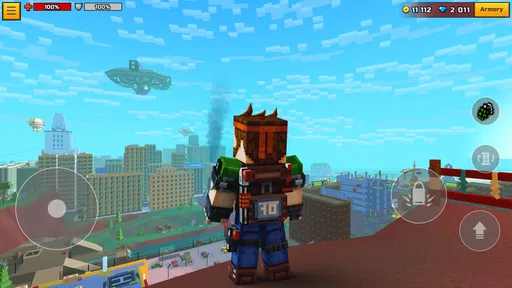
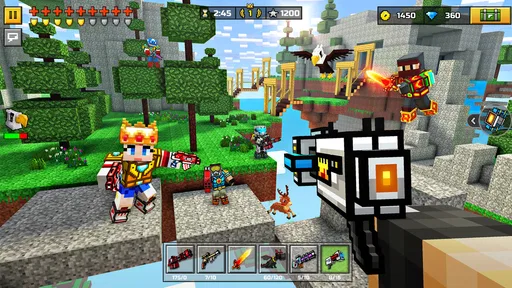
First things first, let's talk about the vibe. Pixel Gun 3D throws you into a world that's both nostalgic and refreshingly modern. It's like someone took the essence of classic blocky graphics and injected it with high-octane FPS action. The result? A game that’s both visually charming and seriously addictive.
From the moment you launch the app, you’re greeted with a colorful, pixel-perfect menu. Everything is intuitive, so you won't waste any time figuring out how to jump into the action. The game offers a variety of modes, catering to all types of players. Whether you’re into team battles, solo missions, or just want to wreak havoc in a free-for-all, there's something for everyone.
Game Modes Galore
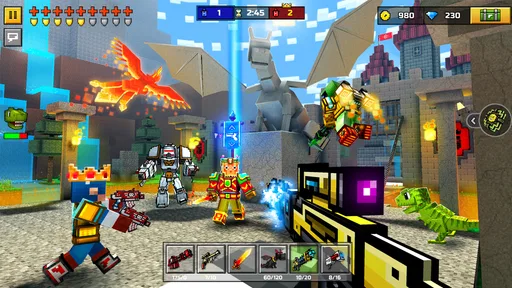
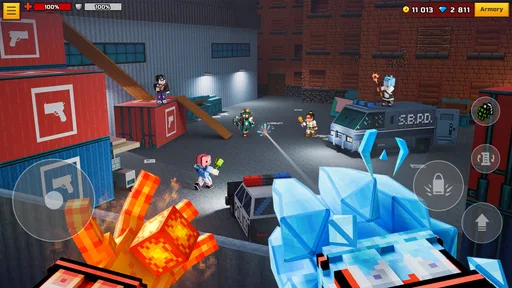
Let’s dive into those modes a bit. The classic Deathmatch is where I spent most of my time. It’s fast-paced, chaotic, and incredibly fun. You can either jump into a global match or create a local game to challenge your buddies. The controls are smooth, and the weapons are diverse enough to keep you experimenting with different strategies.
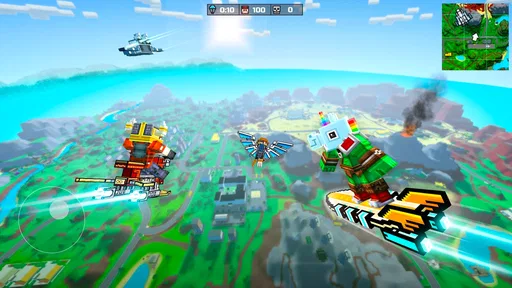
Then there's the Battle Royale mode. It's a must-try. Think of it as a pixelated version of your favorite BR games but with a unique twist. You start off parachuting onto the map, scavenging for weapons, and trying to be the last one standing. The shrinking play area keeps the adrenaline pumping, and the whimsical graphics make even the tensest moments feel light-hearted.
Customization and Creativity
One of the standout features in Pixel Gun 3D is the customization. You’re not just limited to picking up weapons; you can craft them. The game lets you get creative with your arsenal, crafting weapons that suit your playstyle. Want a sniper rifle with a bit more oomph? Go for it! The possibilities are almost endless.
And it’s not just weapons. Your character can be customized too. From skins to accessories, you can tailor your look to stand out on the battlefield. The level of detail in customization adds a personal touch that many mobile shooters lack.
Community and Social Interaction
Another aspect I loved about the game is its social features. You can join clans, team up with friends, or even make new ones. The chat feature lets you coordinate during matches or just talk strategy. The community is vibrant and welcoming, which makes the whole experience even more enjoyable.
Plus, there are regular events and updates, ensuring that the game never feels stale. The developers seem committed to keeping the game fresh and engaging, which is always a plus in my book.
Pixel Gun 3D is an action game from Pixel Gun 3D, and its long-running presence is reflected in its 4.2 average from around 5.8 million ratings, with more than 100 million installs. It is free to download, rated Teen, and version 26.5.0 requires Android 7.0 or later. Those details make it easy to see why it has reached a broad audience, but they don’t tell you whether its particular blend of modes and customization suits your habits.
For a realistic everyday scenario, I’d use it in two different ways: a few quick online rounds when I have a short break, or offline play when I’m away from a dependable connection. The first is best when I want unpredictable human opponents; the second is more convenient when I simply want to play without arranging a match around connectivity. If I’m meeting friends, the social side gives us another reason to jump in together, but I’d still check that everyone is comfortable with the game’s controls and pace before planning a long session.
The audience fit is fairly clear to me. Players who enjoy colorful visuals, frequent action, weapon experimentation, and social play will find plenty to explore. Someone who wants a quiet single-player campaign, a realistic presentation, or a carefully measured tactical shooter may be happier elsewhere. The Teen content rating is also worth keeping in mind when deciding whether the game is appropriate for a younger player.
Things to keep in mind before settling in
Fast multiplayer can be demanding, and a lively match is not always a gentle introduction. If I’m losing track of opponents or reacting late, I’d simplify the goal rather than trying to master every mode at once. Focusing on movement, learning a route, or becoming comfortable with one weapon at a time makes the busy moments easier to read.
The variety is a strength, but it can also make the game feel like a lot to take in if I want a single, consistent routine. I’d avoid judging the whole experience from one match, especially if that mode is not the one I enjoy most. At the same time, I wouldn’t force myself to keep playing just because there is more content to explore: if the fast pace, online competition, or optional spending is not appealing, a slower or more focused game may be a better use of my time.
For players wondering whether they need a constant connection, the answer depends on what they want from a session. Online modes are the place for live competition and social play, while the offline PvE option provides a way to play without Wi-Fi. If their main reason for installing is to compete with friends, they should plan around online access; if they mostly want something available during a commute or in a spotty-connection situation, offline play is the more practical choice.
Wrapping It Up
So, is Pixel Gun 3D - FPS Shooter worth your time? Absolutely. It's a charming, action-packed shooter that doesn’t take itself too seriously. The blend of retro graphics with modern gameplay mechanics offers a unique experience that’s hard to find elsewhere.
If you’re looking for a fun, social, and customizable FPS to sink your teeth into, this app might just be your next obsession. Download it, dive in, and let the pixelated chaos commence!
My more measured recommendation is to start with a few short sessions, test different modes, and decide which parts you genuinely enjoy before committing lots of time or money. I’d keep purchases optional, choose settings that feel comfortable rather than copying someone else’s setup, and use offline play when connection is the obstacle. With those expectations, it’s an easy game to sample and a lively choice for anyone who wants a playful mobile shooter with room to experiment.
Pros
- Engaging multiplayer modes with friends.
- Wide variety of weapons and skins.
- Frequent updates with new content.
- User-friendly interface and controls.
- Customizable characters and avatars.
Cons
- In-app purchases can be pricey.
- Occasional lag in multiplayer matches.
- Advertisements can be intrusive.
- Requires consistent internet connection.
- Battery drains quickly during play.
FAQs for Pixel Gun 3D - FPS Shooter
What is Pixel Gun 3D and what makes it unique?
Pixel Gun 3D is a multiplayer first-person shooter game that combines pixelated graphics with engaging gameplay. It stands out due to its vast array of weapons, customizable characters, and various game modes, including Battle Royale. The blend of creativity and competitive play makes it appealing to both casual and hardcore gamers.
Is Pixel Gun 3D free to play, and are there in-app purchases?
Yes, Pixel Gun 3D is free to download and play. However, it includes in-app purchases for virtual currency, weapons, and cosmetic items. While spending can enhance the gaming experience, it’s not mandatory to enjoy the game’s full range of features. Players can progress by earning rewards through gameplay.
What devices and platforms support Pixel Gun 3D?
Pixel Gun 3D is available on both Android and iOS platforms. It supports a wide range of devices as long as they meet the minimum system requirements. Users should ensure their device is updated to the latest operating system version for optimal performance and access to the latest features.
Does Pixel Gun 3D require an internet connection to play?
While Pixel Gun 3D offers offline modes, the full experience, including multiplayer battles and events, requires an internet connection. Playing online allows you to join friends, participate in competitive matches, and access new content and updates released by the developers.
Are there any safety concerns or age restrictions for playing Pixel Gun 3D?
Pixel Gun 3D is rated for ages 12 and up due to its cartoonish violence and online interactions. Parents should be aware of in-app purchases and potential exposure to unmoderated chat. It’s advisable to monitor gameplay and ensure appropriate settings are enabled for younger players.


